
Analyses
Download as a Dyad projecttransient_man.zipOpen in Dyad Studio
In Dyad, an analysis is "the things you can do with a model". A typical workflow in Dyad is to create a set of components, and then create an analysis that runs on the entry point to that set of components. It produces a solution object that provides information about the model, and can be used to build various visualizations.
Analyses can perform a wide variety of model analytics, such as:
Run a parameter sweep
and much more. All analyses have a common interface which take in the model, run an analysis, and give back a pre-defined set of artifacts, such as plots of the solution or generated binaries.
Using an Analysis (Dyad Studio)
Dyad Studio includes a lower level interface to define and interact with analyses at the Julia level, with more flexibility than what is exposed in the GUI.
Example: TransientAnalysis of a Simple Block
Using the Dyad-Level Analysis Interface (Dyad Studio)
A TransientAnalysis for the SecondOrderSystemTest component is written in Dyad as:
analysis SecondOrderSystemTransient
  extends TransientAnalysis(stop=5)
  model = DyadExampleComponents.SecondOrderSystemTest()
end
The Dyad compiler will generate the SecondOrderSystemTransient function that will run the analysis.
result = SecondOrderSystemTransient()Transient Analysis Solution for DyadExampleComponents.SecondOrderSystemTest
with 2 differential equations and 0 algebraic equations
retcode: Success
Interpolation: 3rd order Hermite
t: 182-element Vector{Float64}: [0.0, 9.999999999999999e-5 … 4.994457388635665, 5.0]
u: 182-element Vector{Vector{Float64}}:
[0.0, 0.0]
[5.23599e-12, 1.5708e-7]
[2.72156e-7, 0.000218625]
[1.45132e-5, 0.00306923]
[9.42496e-5, 0.0104177]
[0.000319948, 0.0224379]
[0.000791181, 0.037897]
[0.00157842, 0.0530897]
[0.00269796, 0.0627454]
[0.00408712, 0.0604399]
⋮
[0.152786, 0.000750196]
[0.152843, 0.00732454]
[0.153429, 0.0337494]
[0.154631, 0.056428]
[0.156366, 0.0630568]
[0.158224, 0.041306]
[0.158963, 0.0163165]
[0.159153, 0.000481232]
[0.159154, -1.06822e-7]We can plot this result, using either Plots.jl or Makie.jl. We'll use Plots here:
using Plots
plot(result)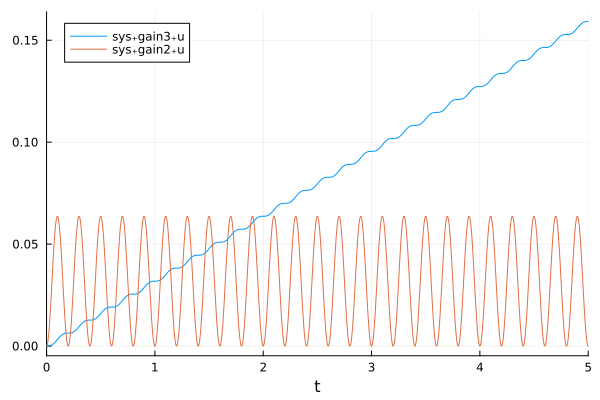
See the plotting guide below for more details on how to plot the results of an analysis.
We can also get artifacts from this result, like:
using DyadInterface: artifacts
artifacts(result, :SimulationSolutionTable)| Row | timestamp | sys₊gain3₊u(t) | sys₊gain2₊u(t) |
|---|---|---|---|
| Float64 | Float64 | Float64 | |
| 1 | 0.0 | 0.0 | 0.0 |
| 2 | 0.0001 | 5.23599e-12 | 1.5708e-7 |
| 3 | 0.00373284 | 2.72156e-7 | 0.000218625 |
| 4 | 0.0140931 | 1.45132e-5 | 0.00306923 |
| 5 | 0.0265126 | 9.42496e-5 | 0.0104177 |
| 6 | 0.040465 | 0.000319948 | 0.0224379 |
| 7 | 0.0561033 | 0.000791181 | 0.037897 |
| 8 | 0.073279 | 0.00157842 | 0.0530897 |
| 9 | 0.0923426 | 0.00269796 | 0.0627454 |
| 10 | 0.114446 | 0.00408712 | 0.0604399 |
| 11 | 0.139493 | 0.0053987 | 0.0421486 |
| 12 | 0.161434 | 0.00608715 | 0.0206412 |
| 13 | 0.185255 | 0.00634959 | 0.0033547 |
| 14 | 0.210064 | 0.00637151 | 0.00157775 |
| 15 | 0.242371 | 0.00673065 | 0.0242746 |
| 16 | 0.265738 | 0.00756681 | 0.0469351 |
| 17 | 0.29279 | 0.00909223 | 0.0628487 |
| 18 | 0.320343 | 0.0108012 | 0.0573799 |
| 19 | 0.349821 | 0.0121483 | 0.0320102 |
| 20 | 0.375266 | 0.0126555 | 0.00913586 |
| 21 | 0.4026 | 0.0127325 | 0.000106104 |
| 22 | 0.433885 | 0.0129249 | 0.0163957 |
| 23 | 0.460257 | 0.0136894 | 0.0419117 |
| 24 | 0.487363 | 0.0151215 | 0.0611863 |
| 25 | 0.51542 | 0.0168782 | 0.0599993 |
| 26 | 0.54796 | 0.0184532 | 0.0338691 |
| 27 | 0.573421 | 0.0190036 | 0.0104665 |
| 28 | 0.601658 | 0.0190986 | 4.31658e-5 |
| 29 | 0.632747 | 0.019273 | 0.0154106 |
| 30 | 0.659841 | 0.0200382 | 0.0415157 |
| 31 | 0.687015 | 0.0214664 | 0.0610499 |
| 32 | 0.715345 | 0.0232399 | 0.0600341 |
| 33 | 0.748159 | 0.0248261 | 0.0336709 |
| 34 | 0.77373 | 0.025373 | 0.0102389 |
| 35 | 0.802116 | 0.0254648 | 7.03303e-5 |
| 36 | 0.833484 | 0.0256507 | 0.0160465 |
| 37 | 0.86053 | 0.0264332 | 0.0421703 |
| 38 | 0.887841 | 0.0278831 | 0.0613676 |
| 39 | 0.916306 | 0.0296635 | 0.0595761 |
| 40 | 0.948641 | 0.0312084 | 0.0331899 |
| 41 | 0.974344 | 0.0317454 | 0.00979164 |
| 42 | 1.00266 | 0.0318311 | 0.000111409 |
| 43 | 1.03433 | 0.0320308 | 0.0167843 |
| 44 | 1.0612 | 0.0328277 | 0.0427971 |
| 45 | 1.08861 | 0.0342969 | 0.0616474 |
| 46 | 1.11715 | 0.0360798 | 0.0591531 |
| 47 | 1.14906 | 0.0375885 | 0.0327689 |
| 48 | 1.17485 | 0.0381165 | 0.0094268 |
| 49 | 1.2031 | 0.0381973 | 0.000151029 |
| 50 | 1.235 | 0.0384085 | 0.0173834 |
| 51 | 1.26172 | 0.0392164 | 0.043286 |
| 52 | 1.28922 | 0.0407005 | 0.0618539 |
| 53 | 1.3178 | 0.0424846 | 0.058811 |
| 54 | 1.34941 | 0.043966 | 0.0324221 |
| 55 | 1.37526 | 0.0444865 | 0.00913812 |
| 56 | 1.40346 | 0.0445636 | 0.000187896 |
| 57 | 1.43556 | 0.0447846 | 0.0178846 |
| 58 | 1.46215 | 0.0456016 | 0.0436925 |
| 59 | 1.48973 | 0.0470981 | 0.0620187 |
| 60 | 1.51836 | 0.0488834 | 0.0585128 |
| 61 | 1.54972 | 0.0503422 | 0.0321122 |
| 62 | 1.57562 | 0.0508559 | 0.00888629 |
| 63 | 1.60378 | 0.0509298 | 0.00022475 |
| 64 | 1.63608 | 0.0511601 | 0.0183493 |
| 65 | 1.66256 | 0.0519857 | 0.0440698 |
| 66 | 1.6902 | 0.0534939 | 0.0621661 |
| 67 | 1.71888 | 0.0552802 | 0.0582233 |
| 68 | 1.75003 | 0.0567182 | 0.0318055 |
| 69 | 1.77598 | 0.0572252 | 0.00864151 |
| 70 | 1.80411 | 0.0572961 | 0.000265084 |
| 71 | 1.8366 | 0.0575361 | 0.0188271 |
| 72 | 1.86298 | 0.0583705 | 0.0444568 |
| 73 | 1.8907 | 0.0598907 | 0.0623116 |
| 74 | 1.91943 | 0.0616782 | 0.0579129 |
| 75 | 1.95036 | 0.063095 | 0.0314726 |
| 76 | 1.97636 | 0.0635947 | 0.00838044 |
| 77 | 2.00447 | 0.0636624 | 0.000313217 |
| 78 | 2.03719 | 0.0639135 | 0.0193644 |
| 79 | 2.06346 | 0.0647578 | 0.0448902 |
| 80 | 2.09125 | 0.0662916 | 0.0624673 |
| 81 | 2.12006 | 0.0680804 | 0.0575497 |
| 82 | 2.15075 | 0.0694735 | 0.0310783 |
| 83 | 2.17681 | 0.0699646 | 0.00807744 |
| 84 | 2.2049 | 0.0700287 | 0.000376095 |
| 85 | 2.2379 | 0.0702937 | 0.0200242 |
| 86 | 2.26404 | 0.0711503 | 0.0454186 |
| 87 | 2.29194 | 0.0727007 | 0.0626464 |
| 88 | 2.32083 | 0.0744912 | 0.0570836 |
| 89 | 2.35126 | 0.0758554 | 0.0305691 |
| 90 | 2.37739 | 0.0763353 | 0.00769507 |
| 91 | 2.40546 | 0.0763952 | 0.000466814 |
| 92 | 2.43886 | 0.0766794 | 0.0209129 |
| 93 | 2.46482 | 0.0775523 | 0.0461227 |
| 94 | 2.49287 | 0.0791251 | 0.0628658 |
| 95 | 2.5219 | 0.0809178 | 0.0564217 |
| 96 | 2.55199 | 0.0822435 | 0.0298438 |
| 97 | 2.57822 | 0.0827076 | 0.00716666 |
| 98 | 2.60627 | 0.0827618 | 0.000614902 |
| 99 | 2.64027 | 0.083076 | 0.0222493 |
| 100 | 2.666 | 0.0839733 | 0.0471633 |
| 101 | 2.69427 | 0.0855796 | 0.0631469 |
| 102 | 2.72353 | 0.0873753 | 0.0553526 |
| 103 | 2.75316 | 0.0886439 | 0.0286763 |
| 104 | 2.77954 | 0.0890827 | 0.00635318 |
| 105 | 2.80759 | 0.0891289 | 0.000901373 |
| 106 | 2.84264 | 0.0894976 | 0.0245329 |
| 107 | 2.868 | 0.0904359 | 0.0488904 |
| 108 | 2.89667 | 0.092098 | 0.0634877 |
| 109 | 2.92642 | 0.0938982 | 0.0533148 |
| 110 | 2.95536 | 0.0950706 | 0.0265005 |
| 111 | 2.982 | 0.0954628 | 0.00495263 |
| 112 | 3.01014 | 0.0954982 | 0.0016019 |
| 113 | 3.04636 | 0.0959618 | 0.0281941 |
| 114 | 3.07132 | 0.0969687 | 0.0515919 |
| 115 | 3.10053 | 0.0987096 | 0.0636572 |
| 116 | 3.13135 | 0.100518 | 0.0494333 |
| 117 | 3.15931 | 0.101534 | 0.0226564 |
| 118 | 3.18646 | 0.101846 | 0.00283614 |
| 119 | 3.21491 | 0.101876 | 0.00342606 |
| 120 | 3.24812 | 0.102379 | 0.0299485 |
| 121 | 3.27363 | 0.103456 | 0.0533498 |
| 122 | 3.30226 | 0.105186 | 0.0635811 |
| 123 | 3.33391 | 0.107008 | 0.0472422 |
| 124 | 3.36112 | 0.10794 | 0.0209324 |
| 125 | 3.38853 | 0.108217 | 0.0020453 |
| 126 | 3.41703 | 0.108251 | 0.00444684 |
| 127 | 3.44893 | 0.10877 | 0.0307613 |
| 128 | 3.47466 | 0.109878 | 0.0540975 |
| 129 | 3.50301 | 0.1116 | 0.0635192 |
| 130 | 3.53505 | 0.113427 | 0.0462334 |
| 131 | 3.56192 | 0.114322 | 0.0201834 |
| 132 | 3.58944 | 0.114585 | 0.00173646 |
| 133 | 3.61797 | 0.114621 | 0.00493623 |
| 134 | 3.64938 | 0.11515 | 0.0312088 |
| 135 | 3.67519 | 0.116272 | 0.0544695 |
| 136 | 3.70344 | 0.117993 | 0.063476 |
| 137 | 3.73571 | 0.119824 | 0.0456412 |
| 138 | 3.76242 | 0.120698 | 0.0197267 |
| 139 | 3.79 | 0.120952 | 0.00155728 |
| 140 | 3.81857 | 0.12099 | 0.00526353 |
| 141 | 3.8497 | 0.121526 | 0.0315335 |
| 142 | 3.87556 | 0.122659 | 0.0547339 |
| 143 | 3.90377 | 0.12438 | 0.0634384 |
| 144 | 3.93624 | 0.126214 | 0.0451648 |
| 145 | 3.96283 | 0.127072 | 0.0193485 |
| 146 | 3.99048 | 0.127319 | 0.00141391 |
| 147 | 4.01909 | 0.127359 | 0.00555386 |
| 148 | 4.05 | 0.127902 | 0.0318343 |
| 149 | 4.07591 | 0.129044 | 0.0549756 |
| 150 | 4.10409 | 0.130767 | 0.063399 |
| 151 | 4.13676 | 0.132603 | 0.0446935 |
| 152 | 4.16324 | 0.133446 | 0.0189715 |
| 153 | 4.19096 | 0.133686 | 0.00127618 |
| 154 | 4.21962 | 0.133728 | 0.00585812 |
| 155 | 4.25033 | 0.134278 | 0.0321573 |
| 156 | 4.27629 | 0.135431 | 0.0552308 |
| 157 | 4.30444 | 0.137155 | 0.0633522 |
| 158 | 4.33733 | 0.138995 | 0.0441658 |
| 159 | 4.3637 | 0.139821 | 0.0185499 |
| 160 | 4.3915 | 0.140053 | 0.00112895 |
| 161 | 4.42023 | 0.140098 | 0.0062141 |
| 162 | 4.45071 | 0.140657 | 0.0325404 |
| 163 | 4.47673 | 0.141822 | 0.0555278 |
| 164 | 4.50486 | 0.143548 | 0.063291 |
| 165 | 4.53804 | 0.145392 | 0.0435159 |
| 166 | 4.56427 | 0.146198 | 0.0180341 |
| 167 | 4.59217 | 0.146419 | 0.000959045 |
| 168 | 4.62099 | 0.146469 | 0.00667202 |
| 169 | 4.65121 | 0.147039 | 0.0330374 |
| 170 | 4.6773 | 0.14822 | 0.0559044 |
| 171 | 4.70541 | 0.149949 | 0.0632023 |
| 172 | 4.73897 | 0.151799 | 0.0426368 |
| 173 | 4.76504 | 0.152577 | 0.0173437 |
| 174 | 4.79307 | 0.152786 | 0.000750196 |
| 175 | 4.82203 | 0.152843 | 0.00732454 |
| 176 | 4.85192 | 0.153429 | 0.0337494 |
| 177 | 4.87811 | 0.154631 | 0.056428 |
| 178 | 4.90622 | 0.156366 | 0.0630568 |
| 179 | 4.94038 | 0.158224 | 0.041306 |
| 180 | 4.96621 | 0.158963 | 0.0163165 |
| 181 | 4.99446 | 0.159153 | 0.000481232 |
| 182 | 5.0 | 0.159154 | -1.06822e-7 |
For the artifacts allowed for a given analysis, see the pages which define the given analysis.
Defining and Running an Analysis
Any analysis is available and meant to run in Julia. For an analysis called MyAnalysis in Dyad, the generated Julia code will be created with the following format:
result = MyAnalysis(; kwargs...)where the kwargs are keyword arguments corresponding to the arguments of the analysis run definition (i.e. the fields that can be set at the Dyad level). This invocation will be set to automatically have the keyword arguments default to the values defined in the Dyad version, for example for a TransientAnalysis if one had set stop = 10.0, then stop = 10.0 will be the default value in the generated function. These defaults can thus be overruled by declaring the keyword argument, for example MyAnalysis(; stop=20.0) will run a version of the analysis which overrides the stop time to 20.0.
Analysis Result Interface
The analysis results can be interacted with in two ways: there are the customizable plot and the artifacts. The most basic usage is to get the artifacts via:
artifacts(result, name::Symbol)The allowed artifacts can be queried via:
artifacts(results)which returns a list of all the available artifact names. For more details about all the artifacts,
AnalysisSolutionMetadata(result)can be used, which also includes descriptions for all the artifacts.
Additionally, some analyses include a customizable visualization:
customizable_visualization(::AbstractAnalysisSolution, ::PlotlyVisualizationSpec)This will be defined fully in future versions.
Defining Your Own Analysis
At the lowest level, analyses are implemented in Julia, see the Custom analysis tutorial for more details on how to write your own.