
LIBRARY

Tables.Tests.InterpolationTable
Tests interpolation by applying linear interpolation to a dataset of squares.
This component creates an interpolation object configured with linear interpolation and a dataset containing time values from 0 to 1 and their corresponding squared values. The current simulation time is used as the input to the interpolation, and the interpolated output is assigned to the variable y. The metadata includes a test case that runs until time=1 and verifies the y signal.
Usage
BlockComponents.Tables.Tests.InterpolationTable()
Parameters:
| Name | Description | Units | Default value |
|---|---|---|---|
dataset | Dataset containing time values from 0 to 1 and their squares, with 'ts' as independent variable and 'data' as dependent variable | – | DyadTimeser...t_var="ts") |
Variables
| Name | Description | Units |
|---|---|---|
y | Output variable that receives the interpolated value | – |
Behavior
Behavior of this component cannot be rendered because it includes path variables.
Source
dyad
"""
Tests interpolation by applying linear interpolation to a dataset of squares.

This component creates an interpolation object configured with linear interpolation and a dataset
containing time values from 0 to 1 and their corresponding squared values. The current simulation
time is used as the input to the interpolation, and the interpolated output is assigned to the
variable `y`. The metadata includes a test case that runs until time=1 and verifies the `y` signal.
"""
test component InterpolationTable
  "Interpolation object that performs linear interpolation on the dataset"
  interp = BlockComponents.Tables.Interpolation(interpolation_type = InterpolationType.LinearInterpolation(), dataset = dataset) {
    "Dyad": {
      "placement": {
        "diagram": {"iconName": "default", "x1": 170, "y1": 70, "x2": 270, "y2": 170, "rot": 0}
      }
    }
  }
  "Dataset containing time values from 0 to 1 and their squares, with 'ts' as independent variable and 'data' as dependent variable"
  structural parameter dataset::DyadData.DyadTimeseries = DyadTimeseries(hcat(0:0.1:1, square(0:0.1:1)), dependent_vars = ["data"], independent_var = "ts")
  "Output variable that receives the interpolated value"
  variable y::Real
relations
  interp.u = time
  interp.y = y
metadata {
  "Dyad": {
    "icons": {"default": "dyad://BlockComponents/Example.svg"},
    "tests": {"case1": {"stop": 1, "expect": {"signals": ["y"]}}},
    "doc": {"behavior": false}
  }
}
end
Flattened Source
dyad
"""
Tests interpolation by applying linear interpolation to a dataset of squares.

This component creates an interpolation object configured with linear interpolation and a dataset
containing time values from 0 to 1 and their corresponding squared values. The current simulation
time is used as the input to the interpolation, and the interpolated output is assigned to the
variable `y`. The metadata includes a test case that runs until time=1 and verifies the `y` signal.
"""
test component InterpolationTable
  "Interpolation object that performs linear interpolation on the dataset"
  interp = BlockComponents.Tables.Interpolation(interpolation_type = InterpolationType.LinearInterpolation(), dataset = dataset) {
    "Dyad": {
      "placement": {
        "diagram": {"iconName": "default", "x1": 170, "y1": 70, "x2": 270, "y2": 170, "rot": 0}
      }
    }
  }
  "Dataset containing time values from 0 to 1 and their squares, with 'ts' as independent variable and 'data' as dependent variable"
  structural parameter dataset::DyadData.DyadTimeseries = DyadTimeseries(hcat(0:0.1:1, square(0:0.1:1)), dependent_vars = ["data"], independent_var = "ts")
  "Output variable that receives the interpolated value"
  variable y::Real
relations
  interp.u = time
  interp.y = y
metadata {
  "Dyad": {
    "icons": {"default": "dyad://BlockComponents/Example.svg"},
    "tests": {"case1": {"stop": 1, "expect": {"signals": ["y"]}}},
    "doc": {"behavior": false}
  }
}
end
Test Cases
Test Case case1
julia
plt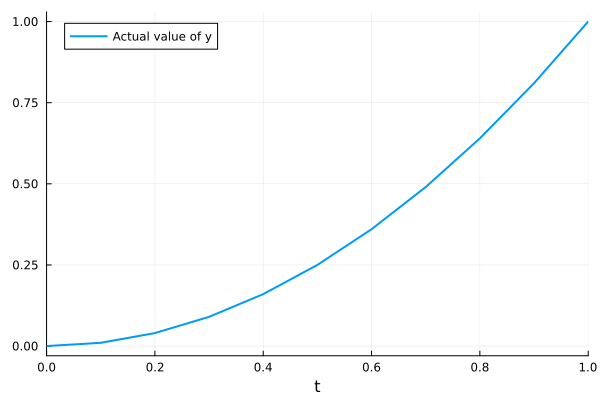
Related
Examples
Experiments
Analyses
Tests