Transient Analysis
The TransientAnalysis is used to simulate a component over a given time interval. For this analysis, the user defines an initial value problem (IVP) with a time interval to simulate and the transient analysis returns artifacts which describe the solution trajectory of the system.
Method Overview
The Dyad compiler uses the physical description of the system to generate a system of differential-algebraic equations:
where
where initial). This initial value problem is then solved over a time interval from
Example Definition
For this example we will run a transient analysis on the component DeSauty from the ElectricalComponents standard library. A basic usage of the transient analysis sets a run-specific parameters and time interval is given as follows:
analysis MyTransientAnalysis
  extends TransientAnalysis(start = 0, stop = 1e-3)
  parameter C::Conductance = 30e-6
  model = ElectricalComponents.DeSauty(C₁ = C)
end
The Dyad compiler will generate the MyTransientAnalysis function that will run the analysis.
result = MyTransientAnalysis()Transient Analysis Solution for TransientAnalysis
retcode: Success
Interpolation: 3rd order Hermite
t: 20-element Vector{Float64}:
0.0
1.0e-6
1.5857389445950408e-6
7.443128390545448e-6
2.2419755519100783e-5
4.2386957331957804e-5
6.671127669689775e-5
9.612852374494714e-5
0.0001304531398844516
0.00017010748222792235
0.0002152741993368946
0.0002664845879238756
0.00032435380509154377
0.0003898378248639738
0.0004642171804570874
0.0005492918811325104
0.0006475026422276234
0.0007620222018533525
0.000896124008503507
0.001
u: 20-element Vector{Vector{Float64}}:
[0.0, 0.0]
[-2.923820899891337e-6, -0.00017511050717338244]
[-7.33762220038432e-6, -0.00027692318548213805]
[-0.00015874505082579554, -0.0012650101509398277]
[-0.0013761705794446133, -0.0035588311876845347]
[-0.004636685711743706, -0.0061579495004383325]
[-0.010713300305615438, -0.008733300276208219]
[-0.02051949851736155, -0.011156072868204452]
[-0.034547331135910964, -0.013251572332197738]
[-0.053261502064045105, -0.0149567040443593]
[-0.07682267072888717, -0.016247288870651966]
[-0.1053971019227194, -0.0171524758596193]
[-0.139094055005078, -0.017722780120772684]
[-0.1781525431755493, -0.01801739316909959]
[-0.2229552462181465, -0.018088794967030305]
[-0.2741264601007033, -0.01797398568030711]
[-0.33253510039110834, -0.017688221581355218]
[-0.39920379364000697, -0.01722116206775498]
[-0.47470561623721197, -0.01653773845590926]
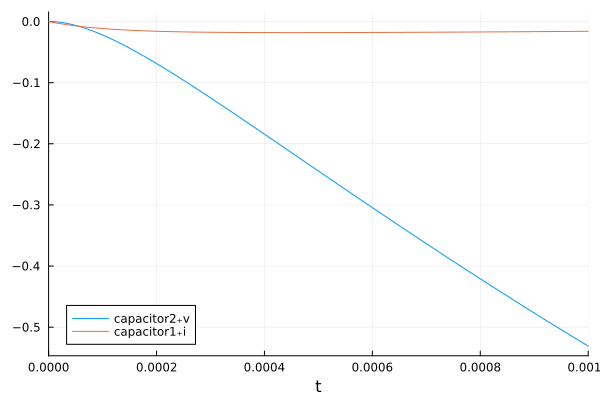
[-0.5309221910268883, -0.01592165715436374]We can plot this result, using either Plots.jl or Makie.jl. We'll use Plots here:
using Plots
Plots.plot(result)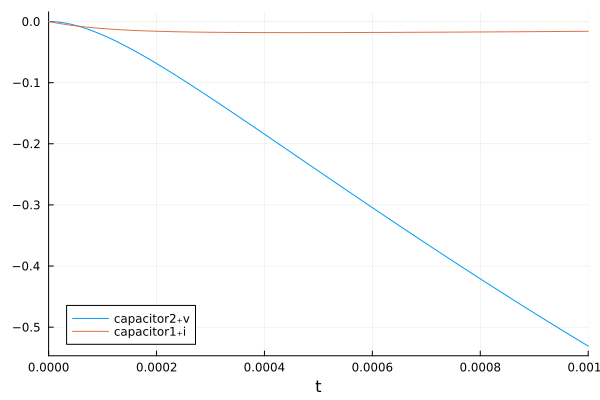
Analysis Arguments
The following arguments define a TransientAnalysis:
Required Arguments
model: the Dyad model that the analysis is being applied to.stop::Time: chooses the end time for the interval.
Optional Arguments
alg::String: chooses the solver algorithm for the solution process. The default is "auto". The choices are:"auto"- Automatic algorithm choice with stiffness detection, size detection, and linear solve swapping from OrdinaryDiffEq.jl."Rodas5P"- Adaptive time Rosenbrock method from OrdinaryDiffEqRosenbrock.jl. The Rosenbrock methods are specifically fast for small systems of stiff equations and DAEs which avoid Jacobian singularity issues (i.e. no variable-index DAE behavior)."FBDF"- Adaptive order, adaptive time fixed leading coefficient backwards differentiation formulae (BDF) method from OrdinaryDiffEqBDF.jl, modeled after the FLC formulation of VODE. This is a good method for large stiff systems and DAEs."Tsit5"- 5th order explicit Runge-Kutta method from OrdinaryDiffEqTsit5.jl. This method is not applicable to DAEs and is only applicable to systems which have no algebraic constraints (post simplification).
start::Time: chooses the start time for the interval. Defaults to 0.abstol::Real: chooses the absolute tolerance for the solver. Defaults to1e-6.reltol::Real: chooses the relative tolerance for the solver. Defaults to1e-3.saveat::Real: chooses the saving interval for the solving process. The default is 0, which corresponds to saving a dense output with a continuous time interpolation for high-fidelity solution at all points. If a non-zero value is chosen, for example,0.1, then it will save at only the interval points (0.1, 0.2, ...) and use a linear interpolation between those points. This should only be used as a performance and memory optimization.dtmax::Time: sets thedtmaxof the ODE solver. Defaults to 0 which uses the default of the solver. Setting this lower can be used to force smaller steps and thus a more accurate solution.
Experimental Arguments
IfLifting::Boolean: sets the iflifting compiler pass in the ModelingToolkit code generation. Currently defaults to false, but will default to true after the feature is made non-experimental.
Artifacts
A TransientAnalysis returns the following artifacts:
Customizable Plot
The customizable plot of a TransientAnalysis is the timeseries plot of the ODE/DAE solve which satisfies the rules and definitiosn of the DifferentialEquations.jl plotting interface.
Standard Plots
:SimulationSolutionPlot: Returns the standard time series plot of the solution trajectory for all values in the state vector.
Tables
:SimulationSolutionTable: Returns a DataFrame of the solution. Ifsaveat=0, then thetare the adaptively chosen points, otherwise thetmatches the interval chosen bysaveat.
Julia-Side Artifacts
:RawSolution: Returns the DifferentialEquations.jl solution type from the run.:SimplifiedSystem: Returns the ModelingToolkit.jl model after structural simplification was performed.:InitialSystem: Returns the initial ModelingToolkit.jl model that was passed to the analysis.
Special Julia-Side Interactivity
The TransientAnalysis includes special Julia-side behaviors for better analyzing the time series of solutions. In particular, if you do:
result = MyTransientAnalysis(; #= kwargs... =#)Transient Analysis Solution for TransientAnalysis
retcode: Success
Interpolation: 3rd order Hermite
t: 20-element Vector{Float64}:
0.0
1.0e-6
1.5857389445950408e-6
7.443128390545448e-6
2.2419755519100783e-5
4.2386957331957804e-5
6.671127669689775e-5
9.612852374494714e-5
0.0001304531398844516
0.00017010748222792235
0.0002152741993368946
0.0002664845879238756
0.00032435380509154377
0.0003898378248639738
0.0004642171804570874
0.0005492918811325104
0.0006475026422276234
0.0007620222018533525
0.000896124008503507
0.001
u: 20-element Vector{Vector{Float64}}:
[0.0, 0.0]
[-2.923820899891337e-6, -0.00017511050717338244]
[-7.33762220038432e-6, -0.00027692318548213805]
[-0.00015874505082579554, -0.0012650101509398277]
[-0.0013761705794446133, -0.0035588311876845347]
[-0.004636685711743706, -0.0061579495004383325]
[-0.010713300305615438, -0.008733300276208219]
[-0.02051949851736155, -0.011156072868204452]
[-0.034547331135910964, -0.013251572332197738]
[-0.053261502064045105, -0.0149567040443593]
[-0.07682267072888717, -0.016247288870651966]
[-0.1053971019227194, -0.0171524758596193]
[-0.139094055005078, -0.017722780120772684]
[-0.1781525431755493, -0.01801739316909959]
[-0.2229552462181465, -0.018088794967030305]
[-0.2741264601007033, -0.01797398568030711]
[-0.33253510039110834, -0.017688221581355218]
[-0.39920379364000697, -0.01722116206775498]
[-0.47470561623721197, -0.01653773845590926]
[-0.5309221910268883, -0.01592165715436374]then artifacts(result, :RawSolution) gives you the DifferentialEquations.jl solution type from the run. Thus for example:
using DyadInterface: artifacts
sol = artifacts(result, :RawSolution)
retcode: Success
Interpolation: 3rd order Hermite
t: 20-element Vector{Float64}:
0.0
1.0e-6
1.5857389445950408e-6
7.443128390545448e-6
2.2419755519100783e-5
4.2386957331957804e-5
6.671127669689775e-5
9.612852374494714e-5
0.0001304531398844516
0.00017010748222792235
0.0002152741993368946
0.0002664845879238756
0.00032435380509154377
0.0003898378248639738
0.0004642171804570874
0.0005492918811325104
0.0006475026422276234
0.0007620222018533525
0.000896124008503507
0.001
u: 20-element Vector{Vector{Float64}}:
[0.0, 0.0]
[-2.923820899891337e-6, -0.00017511050717338244]
[-7.33762220038432e-6, -0.00027692318548213805]
[-0.00015874505082579554, -0.0012650101509398277]
[-0.0013761705794446133, -0.0035588311876845347]
[-0.004636685711743706, -0.0061579495004383325]
[-0.010713300305615438, -0.008733300276208219]
[-0.02051949851736155, -0.011156072868204452]
[-0.034547331135910964, -0.013251572332197738]
[-0.053261502064045105, -0.0149567040443593]
[-0.07682267072888717, -0.016247288870651966]
[-0.1053971019227194, -0.0171524758596193]
[-0.139094055005078, -0.017722780120772684]
[-0.1781525431755493, -0.01801739316909959]
[-0.2229552462181465, -0.018088794967030305]
[-0.2741264601007033, -0.01797398568030711]
[-0.33253510039110834, -0.017688221581355218]
[-0.39920379364000697, -0.01722116206775498]
[-0.47470561623721197, -0.01653773845590926]
[-0.5309221910268883, -0.01592165715436374]sol(1.0)2-element Vector{Float64}:
-5.779234059513262e9
1.1426950848062935e9For more information on using the solution object, see the DifferentialEquations.jl solution interface for more information. This solution allows for using the DifferentialEquations.jl plotting interface, for example:
using Plots
plot(sol)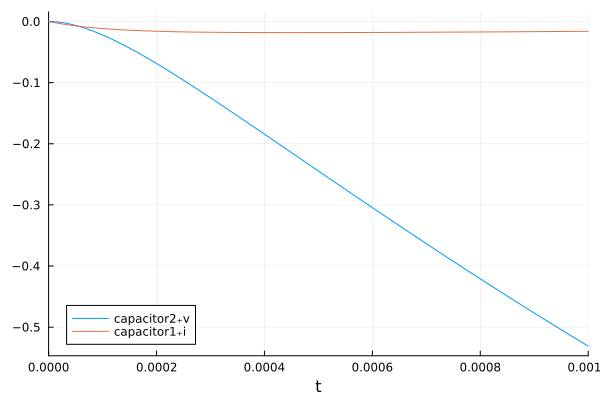
See the DifferentialEquations.jl plotting documentation for more details. Note that for convenience, the original result object can be plotted directly without rebuilding the solution:
plot(result)